

If you’re planning to build and you’re struggling to visualize furniture in your floor plan (while it’s on paper), you are NOT alone!
When you’re working on your floor plan, there comes a time when you start second-guessing room sizes and start questioning whether your king bed will actually fit in the primary bedroom with nightstands on both sides, or if your sectional will work in the living room layout you’re considering.
Believe me, I’ve been there, and so have my BEFORE YOU BUILD℠ clients. In fact, one of my clients recently asked me if I knew of any newer tools that could help her with this exact predicament.
For years, I’ve been teaching my clients to use a free tool from Pottery Barn to visualize furniture placement in their 2d floor plan.
However, that tool has become confusing and hard to use, so I did some research to find something better for my clients.
That’s when I discovered Spoak.
Quick note: This post is NOT sponsored. I paid for Spoak with my own money because I wanted to test it out for my BEFORE YOU BUILD℠ clients. All opinions are 100% my own!
Listen to this episode or read the transcript below.
Links Mentioned in this Episode:
Ready to build without blowing your budget? Watch my FREE training, “3 Simple Steps to Build Your Dream Home Without Blowing Your Budget”.
Below is the transcript for this episode:
Welcome back to the Before You Build Podcast. I’m your host, Carrie Barker (aka Caroline on Design), and today, in episode 97, we’re talking about how to visualize furniture in your floor plan BEFORE you build … in other words, how to see how furniture will fit in your future home’s rooms.
As I mentioned earlier, I used to use (and love) a free room visualization tool from Pottery Barn, but it’s changed over the years, and is no longer easy to use, so that’s when I went on a mission for a better option, and I found Spoak.
What is Spoak?
So what is Spoak?
Domino describes it as “basically Pinterest-Meets-Etsy-Meets-Photoshop for interior design lovers.”
Spoak is a design platform that has shopping and visualization tools to help people “make big design decisions with confidence” … that’s literally their motto, and I LOVE it because that’s exactly what I help people do through my free content and my BEFORE YOU BUILD℠ program.
So anytime I find something that helps YOU make big design decisions with confidence, I’m all over it!
It’s actually a really cool platform … you can make mood boards, do floor planning, room visualization, and create wall elevations. You can even shop for products directly on the platform (which is a cool feature if you’re pulling products from the internet to see how they work together).
But, in full disclosure, I was really only interested in the room visualization feature for my clients. I played around a little bit with the other features, but my main focus was finding an easy platform to visualize furniture in a room so I could teach it to my clients.
My Experience Testing Spoak
So let’s talk about my experience testing Spoak.
I subscribed to the base tier, which is $14.99 per month. My purpose was to test the platform out, see if it was worth recommending, and record video tutorials for my BEFORE YOU BUILD℠ clients.
They do offer a 7-day free trial, but you have to put in your credit card information, so just make sure to set a reminder to cancel before the 7 days are up if you don’t want to continue.
They also offer a discount if you pay annually, but I was only testing the platform, so it wasn’t worth joining for a year.
Also, I like that you can cancel the monthly subscription at any time. This is great if you only need it for a month or two while you’re designing your floor plan and figuring out how furniture will fit in your home.
The Spoak Features I Tested
Let’s talk about the Spoak features I tested.
The Room Visualization Tool
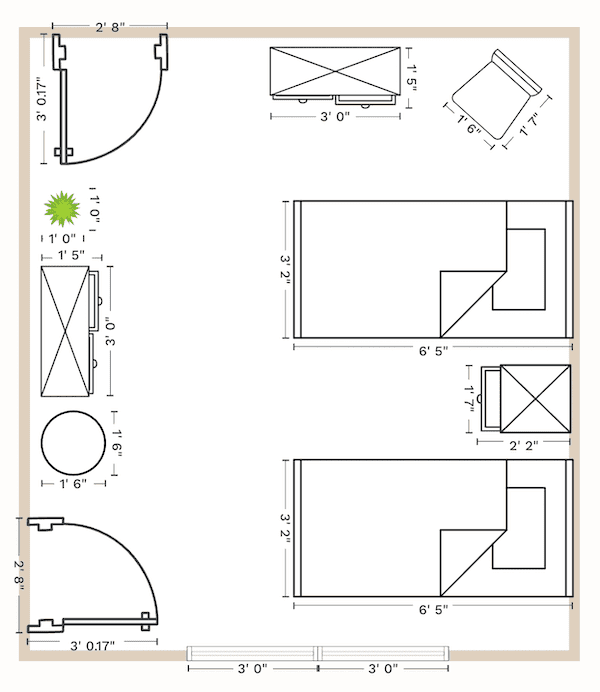
This is the feature that really matters if you’re designing a floor plan. The floor planner itself is user-friendly and intuitive, which makes it easy to get started even if you’re not tech-savvy. You can set up your room dimensions, add furniture from their library, change dimensions if needed, and actually see how everything fits together in a room.
This is incredibly valuable when you’re trying to make decisions about room sizes. Instead of guessing whether a space will work, you can test it visually before your builder breaks ground.
I played around and created a couple of bedroom layouts and a family room / dining room layout. I’ll add pics of these in the show notes.
So this is the feature I needed, and it was very user-friendly.

The Mood Board Creator
Another feature I checked out was the Mood Board Creator.
The mood board feature is very similar to Canva, and since I’m a diehard Canva person and have been using it for YEARS, I’ll continue doing my mood boards there. But if you’re not already a Canva user, Spoak’s mood board tool is worth the monthly expense.
The Chrome Extension
Spoak has a Chrome Extension that allows you to import actual products from all over the internet and drop them right into your project, which is super cool.
This allows you to see how actual products look together. It’s a great feature, but again, I do this over on Canva, so I didn’t explore this feature in depth.
The Elevation Tool
Another feature that I played around with is the ‘Create Elevation’ feature.
It was fun and fairly intuitive.
It’s helpful if you’re working on specific wall designs.
You can create wall elevations like kitchen cabinet and appliance placement, or design your mud room wall, or do something simple like a gallery wall over a console table in your entryway.
It’s a fun feature, and I will definitely dive deeper into this when I start planning my next home in a year or so.
Want help getting clear on YOUR floor plan needs? Download my free Floor Plan Creation Questionnaire to identify what matters most for YOUR family and lifestyle!
The Pros and Cons
Let’s talk about the Spoak pros and cons.
What I Loved (aka Spoak Pros)
- It’s user-friendly for the most part and makes it easy to visualize furniture in your space
- You can test different furniture layout options in your floor plan before building
- The pricing is reasonable for short-term use ($14.99/month with the ability to cancel anytime)
- They do have video tutorials to help you learn the various features (I didn’t take the time to go through these, but I’m sure they’re helpful!)
- And the biggest pro … you can save yourself from making expensive mistakes by catching layout issues BEFORE you build
The Main Drawback (aka Spoak Con)
The biggest con for me is that you can’t make projects private with the lowest tier.
I don’t like this at all.
Your projects are visible to the Spoak community unless you upgrade to a higher plan.
This is a significant limitation if you value privacy with your home design plans.
For this reason, I suggest that you do NOT upload your floor plan to Spoak … unless it’s just one room or one small section.
Is Spoak Worth It for People Building Custom Homes?
Spoak is a solid tool for the specific purpose of visualizing furniture in your floor plan. It’s not perfect—I’d love to see a private project option at the base tier—but for the price, it’s a worthwhile investment if you’re in the active planning phase of your custom home build.
Here’s my honest take: if you’re actively working on your floor plan and struggling to visualize how your furniture will fit, Spoak is absolutely worth the investment for a month or two (or however long you need it).
Honestly, anything that helps you avoid regrets in your custom home is worth trying because once those walls go up, you can’t change your mind about room sizes or layouts without massive budget overages.
The ability to test different layouts and see how your actual furniture dimensions work in each room can save you from very expensive mistakes … and that right there is worth every penny.
We’re talking about potentially avoiding change orders that cost thousands of dollars—all because you realized during planning that a room needed to be slightly larger or configured a little differently.
However, if you just want to create mood boards and you’re already comfortable with Canva, you don’t need Spoak.

How This Fits Into Your Custom Home Planning Process
Bottom line … whether you use Spoak or another tool, visualizing furniture in your floor plan is a critical step in the planning process.
It helps you answer important questions before construction begins—like whether your rooms are appropriately sized for how you’ll actually use them, if the traffic flow makes sense, and where furniture placement will work best.
These are all important things to consider.
Almost as important as considering how your family will actually live in your home. This kind of planning is exactly what you do in my FREE Floor Plan Creation Workbook.
This workbook includes 20 guided questions that help you really consider how your family lives so you can create a floor plan that’s perfect for YOUR family.
The workbook prompts help you think through these layout decisions strategically, and then tools like Spoak can help you visualize the answers, so you can use these in tandem
You can grab your free Floor Plan Creation Workbook at carolineondesign.com/fp-free-workbook!
And if you’re ready to dive deeper into the entire home-building process—from budgeting to builder selection to design decisions—check out my BEFORE YOU BUILD℠ program. It’s designed to help you build your dream home with confidence, clarity, and zero regrets.